Security overview
Last updated Mar 30, 2026
MultiClaw protects your data through multiple independent security layers: local credential storage, TLS connections, app sandboxing, and zero telemetry. Each layer works on its own, reducing the risk that a single vulnerability leads to broader exposure. The architecture follows defense-in-depth principles aligned with ISO/IEC 27001:2022.
This article gives you a high-level view of how MultiClaw handles security and privacy. Each section links to a dedicated article with full details.
Separate trust zones
The desktop app, the local OpenClaw gateway, and MultiClaw Cloud operate as three distinct trust zones, each with its own authentication:
- Desktop app: connects to MultiClaw Cloud over HTTPS and WSS for API calls, real-time updates, agent configuration, and session data.
- Local OpenClaw gateway: connects to MultiClaw Cloud separately over an authenticated WebSocket secured with short-lived signed tokens. These tokens rotate automatically, so a captured token expires before it can be reused.
Each connection enforces its own credentials. No zone shares authentication tokens with another.
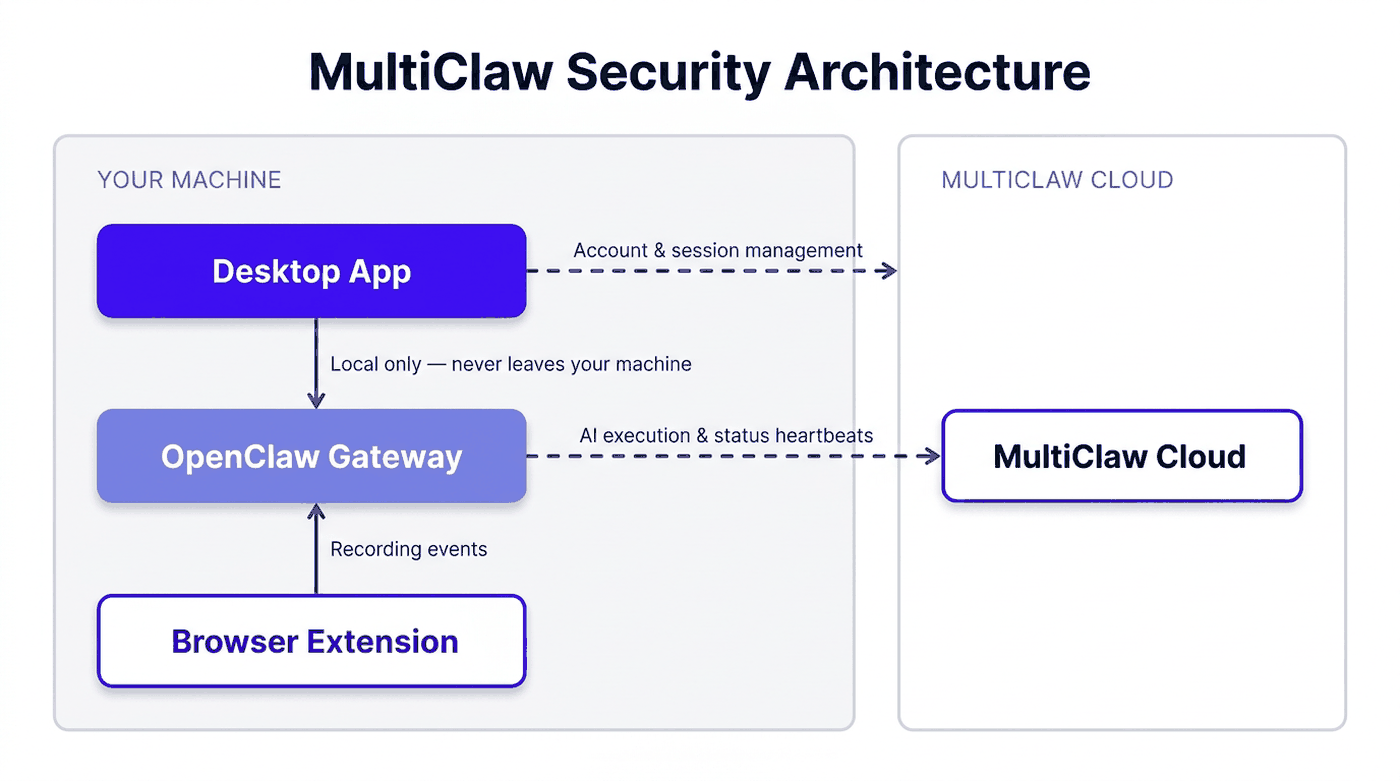
See Network security for details on how each connection is secured.
Authentication and login security
All authentication is handled by MultiClaw Cloud. You can sign in with email and password or through Multiplai single sign-on (SSO). Sessions use short-lived tokens that rotate automatically, and repeated failed login attempts trigger temporary account lockouts.
See Authentication and login security for details on session handling, token rotation, and lockout policies.
Roles and access control
MultiClaw uses role-based access control (RBAC) in workspaces. Each person is assigned exactly one role — Owner or Member — which determines what they can view, create, and manage. Permissions follow a least-privilege model: users only have access to what their role requires.
See Roles and access control for the full permission matrix.
Encryption at rest and in transit
Config values are stored in your local config file (~/.openclaw/openclaw.json) as plain JSON. The file is not encrypted at rest; it is protected by your operating system's file permissions. Credentials and API keys stored in MultiClaw Cloud receive an additional application-layer encryption with AES-256 on top of AWS disk encryption. All connections to external MultiClaw services use TLS 1.2 or higher, covering both HTTPS and WebSocket (WSS) traffic. Communication between the desktop app and the local OpenClaw gateway uses an unencrypted connection on localhost only — this traffic never leaves your machine.
See Data encryption for the full encryption model.
Local-first data storage
Your agents, conversations, and credentials are stored on your machine by default. When you're not connected to a workspace, everything stays local. When you connect to a workspace, conversation transcripts sync to MultiClaw Cloud automatically.
See Data residency and storage for details on where your data lives.
Credential and secret storage
Credentials and other sensitive values are stored in your local config file (~/.openclaw/openclaw.json) as plain JSON, protected by operating system file permissions. The desktop app does not send stored credentials to MultiClaw Cloud. Each credential is scoped to the context that needs it.
See How credentials and secrets are stored for details on how credentials are stored, scoped, and managed.
Sandboxed desktop app
The desktop app is built on Tauri v2, which enforces a capability-based permission model. The interface layer cannot access your filesystem or start processes on its own. Every sensitive operation goes through an explicitly declared Tauri command, limiting the potential damage from any interface-level vulnerability.
See Desktop app security for details on the sandboxing model and capability declarations.
Browser extension isolation
The MultiClaw Chrome Extension content script is loaded on all pages, but it only captures and transmits interaction data when a recording session is active. Event listeners are registered when the extension loads; they check whether recording is active before capturing anything, and no data is collected or sent between sessions.
See Browser extension security for full details on what the extension accesses and when.
Privacy and data handling
MultiClaw Desktop does not collect usage analytics or telemetry. If the app crashes, the crash log stays on your machine. Conversation content stays on your machine unless you choose to sync it to a workspace. MultiClaw Cloud stores only the account, workspace, and session data needed to operate the service.
See Privacy and data handling for what data MultiClaw collects, how long it's retained, and your rights.
Signed updates and supply chain security
App updates are signed with minisign. Before installing an update, the updater verifies the signature against the published public key and rejects any update with an invalid or missing signature. Third-party dependencies are pinned to exact versions, scanned for vulnerabilities, and reviewed before they ship.
See Dependency and supply chain security for the full scanning and review process.
Allowed external connections
MultiClaw makes a fixed, documented set of outbound connections from your machine. Each connection has a specific purpose — API calls, real-time updates, AI execution, or update checks. No undocumented connections are made.
See Allowed external connections for the full list of endpoints, protocols, and when each connection occurs.
Incident reporting
If you discover a security vulnerability, you can report it directly to the MultiClaw security team. Reports are acknowledged within 24 hours and follow a structured triage and resolution process.
See Incident reporting and response for how to submit a report and what to expect.
Shared responsibility
Security in MultiClaw is a shared effort. MultiClaw secures the infrastructure, encrypts data in transit, and hardens the app. You're responsible for protecting your credentials, managing workspace access, and configuring agents appropriately.
See Shared responsibility model for a clear breakdown of what each party owns.
Related articles
Data encryption
MultiClaw Cloud encrypts credentials and API keys with AES-256 and secures all traffic with TLS; local files are plain JSON protected only by OS file permissions.
Network security
How MultiClaw secures every network connection using TLS, authenticated tokens, and no inbound ports.
Browser extension security
What permissions the MultiClaw Chrome Extension requests, how recorded data flows and is retained, and what the extension does not access.