What MultiClaw includes
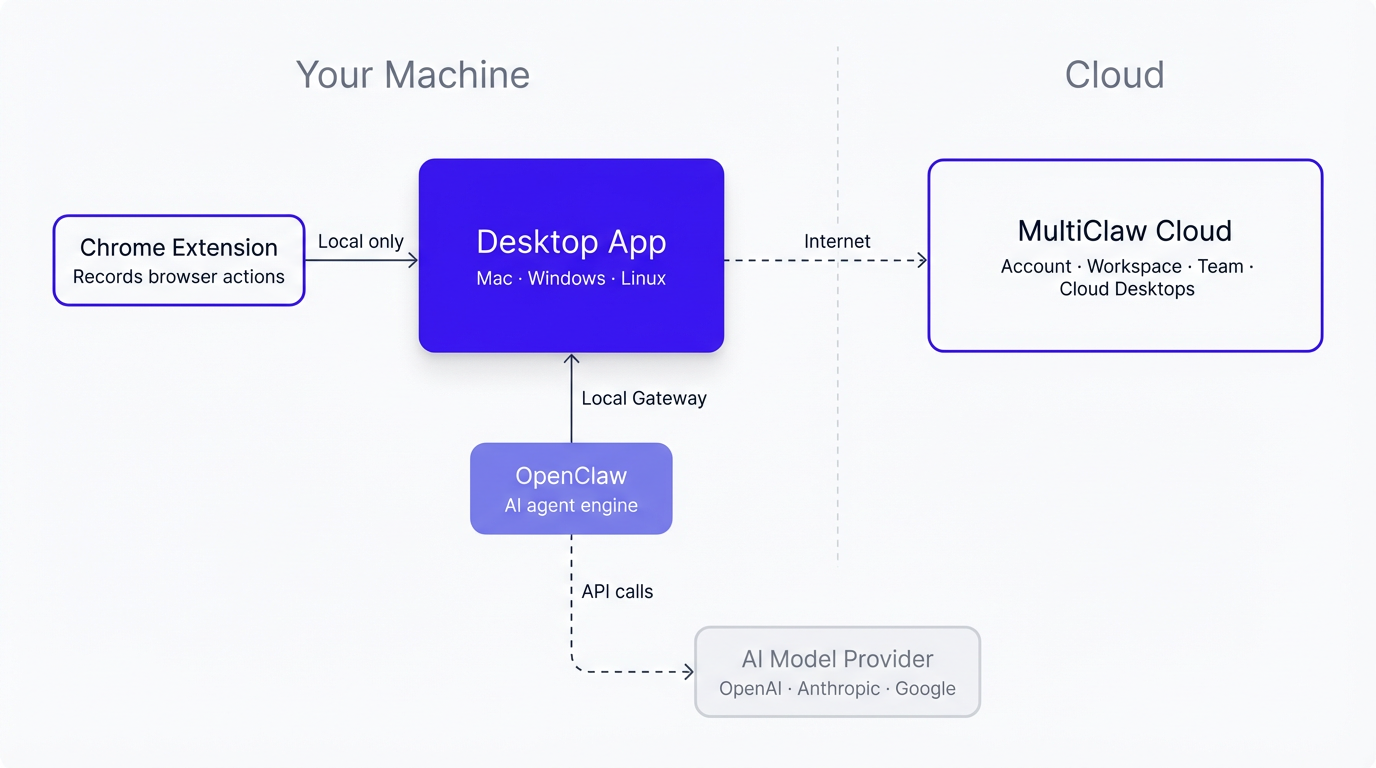
MultiClaw has four components. You interact with the desktop app daily — the others run behind the scenes. Here's what each one does and which ones are required.
The desktop app
The MultiClaw desktop app is your main interface. Install it on your Mac, Windows, or Linux machine. From here you chat with agents, review their plans, approve tasks, browse skills, and track progress.
If you're not sure where to start, open the desktop app.
MultiClaw Cloud
MultiClaw Cloud is the web platform at multiclaw.ai. Use it to create your account, manage your team and workspace, and set up cloud desktops.
MultiClaw Cloud also handles what the desktop app doesn't: inviting teammates, viewing usage dashboards, and setting up guardrails and approval policies.
The MultiClaw Chrome Extension
The MultiClaw Chrome Extension works in Chrome, Chromium, Edge, Brave, and Arc. It records your browser actions — clicks, form fills, page navigation — so you can turn them into reusable skills for your agents.
Install it once, and it runs in the background until you start a recording. The extension communicates only with your local desktop app and does not transmit your browser activity directly to any external server. Recordings saved as skills may later be used in agent conversations, which are processed by your configured AI model provider.
OpenClaw
OpenClaw is the open-source AI agent engine that powers MultiClaw. It runs locally or on a cloud desktop, depending on your setup.
You don't install or manage OpenClaw yourself — MultiClaw handles that automatically. You may see the name in logs or file paths.
What you need
| Component | Required? | When you need it |
|---|---|---|
| Desktop app | Yes | Always — this is your main interface |
| MultiClaw Cloud account | Yes | Required even for local use — needed for activation |
| MultiClaw Chrome Extension | No | Only if you want to record browser workflows to create skills |
| OpenClaw | Automatic | MultiClaw installs and manages it for you |
Related articles
What is MultiClaw?
MultiClaw is a desktop app for running AI agents that do real computer work — on your machine or a cloud desktop.
Install MultiClaw
Download and install MultiClaw on macOS, Windows, or Linux, including system requirements and first-launch setup.
How MultiClaw works
MultiClaw has four components: a desktop app, a cloud platform, a browser extension, and OpenClaw. Here is how they work together.